
Connect AI
Gadwal runs an MCP server on your Mac. Each AI app gets its own token, and you set every one up from one list in Settings.
The server speaks Streamable HTTP at http://127.0.0.1:55183/mcp. It is off until you turn it on, listens on 127.0.0.1 only, and rejects requests from web pages. In Settings › AI & MCP › Connect AI each app has a row with its status (for example “Token issued · no calls yet”) and one button.
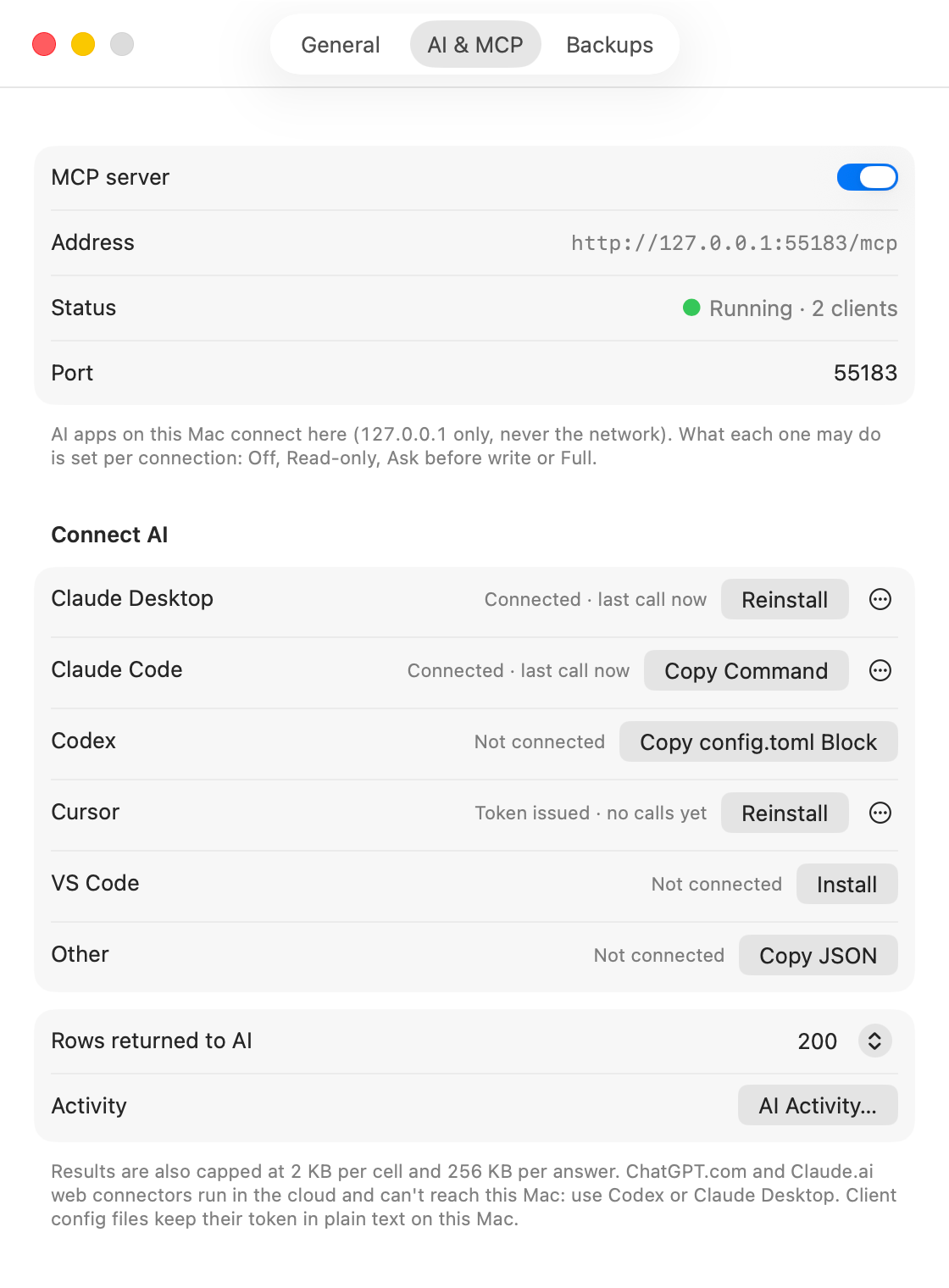
Pick your AI app
| AI app | Button in Gadwal |
|---|---|
| Claude Desktop | Install |
| Claude Code | Copy Command |
| Cursor | Install |
| VS Code (GitHub Copilot) | Install |
| Codex | Copy config.toml Block |
| Other MCP clients | Copy JSON |
What the AI can do
Once connected, the AI can list your connections, read schemas, sample rows, run read-only queries, explain query plans, and search for tables, columns and values. It can also propose changes. What happens to a change depends on the connection’s AI level:
- Read-only: reads run in a read-only session on the server; writes are refused with an explanation.
- Ask before write: writes become pending changes. A review panel shows the SQL and the affected rows, and you approve, edit or reject. The AI can wait for your answer.
- Full: writes run right away and are logged.
At every level, destructive statements (DROP, TRUNCATE, DELETE or UPDATE without a WHERE, and similar) wait for approval, and Gadwal backs up the affected tables before they run (BigQuery uses its built-in 7-day time travel instead).
Results sent to the AI are capped at 200 rows by default (change it in Settings), 2 KB per cell and 256 KB per answer.
The activity log
Every call appears in Settings › AI & MCP › AI Activity… with the app, the connection, the SQL and the outcome. You can export it to CSV.
Questions
Why not ChatGPT.com or Claude.ai in the browser?
Their connectors run on the provider’s servers in the cloud and can’t reach a server on your Mac. That is by design: Gadwal is never exposed to the internet. OpenAI users can connect through Codex, and Claude users through Claude Desktop or Claude Code.
Can I connect several AI apps at once?
Yes. Each one gets its own token, and the AI activity log records which app made each call.
How do I cut an AI app off?
Make a new token for that app in Settings › AI & MCP. The old one stops working at once and the app gets “unauthorized” until you set it up again. Or set the connection’s AI level to Off.